Expand Reolink NVR storage space – Installing and configuring hard disks correctly
In this article, I will give a structured overview of the Reolink NVR models – maximum hard disk size and storage capacity and show what really matters when choosing the right HDD. A Reolink NVR is the central element of a camera surveillance system – and the storage strategy determines how long recordings remain available and how stable the system runs.
I go into detail about the differences between RLN36, RLN16-410, RLN8-410 and RLN12W, explain the maximum hard disk size per model, show the correct choice of surveillance HDD and document the complete installation including formatting and storage management. I also explain how an NVR works with multiple HDDs and why it does not replace a RAID system.
The article summarizes my practical experience and provides a technical classification for a clean, long-term stable storage solution for Reolink surveillance cameras.
At a glance – What is covered in this blog post
- Overview of Reolink NVR models and their maximum hard disk size
- Comparison of RLN36, RLN16-410, RLN8-410 and RLN12W
- Differences in the number of HDDs and total storage capacity
- Choosing the right surveillance HDD for continuous operation
- Technical differences between desktop HDD, surveillance HDD and SSD
- Preparation: Test HDD and check SMART values
- Shutting down the NVR correctly – risks of incorrect shutdown
- Step-by-step installation and connection of the internal HDD
- Formatting and memory management directly in the NVR
- Explanation of the serial storage principle (no RAID)
- Behavior in the event of a hard disk failure
- Backup strategies for additional data security
Reolink NVR models at a glance – maximum hard disk size and storage capacity
An NVR (Network Video Recorder) is the central recording device for IP-based surveillance systems. It takes on the task of permanently storing video data from IP cameras, managing events and making the recordings available in a structured manner. While a single camera can store recordings locally on an SD card, an NVR provides centralized data storage, greater stability and significantly more storage capacity.
An NVR processes the data streams from several cameras simultaneously, stores them on internal HDDs and makes them available via the network, client software or directly on the device. Depending on the model, additional functions such as PoE supply, alarm inputs or several video outputs can be integrated.
Before I started installing additional hard disks, I checked the maximum supported hard disk size for each model. This is because not every NVR allows HDDs of any size. Compatibility depends on both the model and the respective hardware version.
Reolink RLN36 – maximum internal capacity for large systems
The Reolink RLN36 is the most powerful model in the Reolink portfolio and is aimed at larger installations with many cameras.
Key technical data on storage capacity:
- 3× internal HDD
- up to 16TB per HDD
- up to 48TB total (maximum)
- no eSATA connection
- No integrated PoE (supply via PoE switch)
Several HDDs (maximum 3) can only be installed internally. An external hard disk cannot be connected.
The RLN36 is particularly interesting for installations with many 4K cameras or permanently active recording. Unlike the smaller NVRs, the RLN36 is not a PoE NVR. Reolink IP cameras with PoE power supply therefore require an additional PoE switch or PoE injector. In a separate post I have documented the complete installation of the device – including installing the hard disk, setting up the camera and initial configuration: Install Reolink RLN36 NVR | Install hard disk and set up camera
There I show step by step how the NVR is physically installed, integrated into the network and connected to IP cameras.
RLN16-410 – powerful middle ground with hardware-dependent capacity
The hardware version is decisive for the RLN16-410. Visually identical devices can have different storage limits.
Depending on the version:
- 2-3 HDDs internal
- up to 4TB / 6TB / 8TB per HDD
- maximum 12TB or 16TB total
- older versions with eSATA port
It is essential to check the specific hardware version before purchasing a larger HDD.
The model is particularly suitable for medium-sized installations with 8-16 cameras, where sufficient storage capacity is required but not 48TB as with the RLN36.
RLN8-410 – compact NVR with eSATA extension
The RLN8-410 is a classic entry-level PoE NVR for smaller installations.
Storage options:
- 1 internal HDD
- 1 HDD via eSATA connection
- depending on hardware version up to 16TB total
The eSATA port makes it possible to connect an additional HDD without having to open the housing again. This is particularly interesting if the original internal hard disk is not to be replaced.
For typical home installations with multiple IP cameras, this model is a solid solution with the option to expand at a later date.


RLN12W – WLAN NVR with fixed memory limit
The RLN12W is a WLAN NVR without PoE ports and is aimed at installations with wirelessly connected cameras.
Memory configuration:
- 1 internal hard disk
- up to 8TB
- No extension possible
A 2TB HDD is often installed as standard. If you need more memory, you have to replace the internal HDD with a larger one. An extension via eSATA or USB is not planned.

- Innovativen WI-FI 6: Erleben Sie erhöhte Stabilität, beschleunigte Videoübertragung und minimierte Latenz mit unserem innovativen Wi-Fi 6 NVR. Ihre Datensicherheit wird mit dem fortschrittlichen WPA3-Protokoll verbessert. Ihre Informationen bleiben stärker geschützt.
- EINFACHE EINRICHTUNG & KAMERAVERWALTUNG: Vereinfachen Sie Ihre Einrichtung durch mühelose Installation, da sich die WiFi-Kameras nahtlos und ohne Verkabelung mit dem NVR verbinden lassen. Genießen Sie ultimativen Komfort bei der Verwaltung aller Sicherheitskameras. (Die anfängliche Netzwerkkonfiguration erfordert Ethernet-Kabel).
- 24/7-AUFZEICHNUNG & LOKALE SPEICHERUNG: Genießen Sie die kontinuierliche Aufzeichnung mit riesigem Speicherplatz (erweiterbar auf 8 TB). Sichern Sie Ihr Eigentum rund um die Uhr, ohne sich Gedanken über die Speicherkapazität machen zu müssen. Sie können sich beruhigt zurücklehnen, denn alle Aufnahmen werden lokal gespeichert.
- LIVE-ANSICHT & FERNZUGRIFF & KEINE EXTRA GEBÜHREN: Machen Sie sich keine Sorgen, dass Sie Bewegungsereignisse verpassen könnten. Genießen Sie die Freiheit, von jedem beliebigen Ort aus Live-Ansicht anzusehen und Ihre Kameras zu steuern. (Für Zwei-Wege-Audio muss ein Lautsprecher hinzugefügt werden.) Keine extra Gebühren erforderlich.
- DIY ÜBERWACHUNGSSYSTEM: RLN12W kann bis zu 12 Kameras aufnehmen. Alle Reolink WLAN-& Akku-Kameras(außer 4G-Modelle), können in den WiFi NVR integriert werden, wie z.B. Argus PT, Argus 4 Pro, Argus PT Ultra, E1 Serie, E1 Outdoor, TrackMix Wi-Fi, Duo 2 Wi-Fi, RLC-811WA, usw. Stellen Sie Ihr individuelles Überwachungssystem zusammen mit Reolink.
Classification and further content
Anyone planning a monitoring system or wanting to expand existing components should first familiarize themselves with the basic structure of an IP network. In this article, I explain in detail how IP cameras, routers, switches and NVRs interact and how to set up a stable network: Installing surveillance cameras yourself – IP camera network explained simply
There I go into detail about network topology, PoE supply, cabling and typical sources of error.
In addition, I have summarized my experiences with different storage solutions for Reolink surveillance cameras in a separate article: The Best Storage Solutions for Reolink Security Cameras: Recommendations & Experiences
In it, I compare internal HDD solutions, NVR storage, NAS systems and alternative backup strategies.
The choice of the right NVR model therefore depends heavily on the planned use, the number of cameras and the desired storage period. The decisive factors are:
- Number of supported HDDs
- Maximum permitted hard disk size
- Total storage capacity
- Expansion options (eSATA yes/no)
If you take these points into account, you will avoid later restrictions and can tailor the system specifically to your own requirements.


Which hard disk is suitable for a Reolink NVR?
Not every desktop HDD is suitable for use in a Reolink NVR. In an NVR, hard disks run continuously – sometimes for years – and process several video streams at the same time. This is precisely where classic desktop hard disks differ significantly from specially developed surveillance HDDs.
I only use Surveillance hard disks, because these:
- are designed for 24/7 continuous operation
- Process multiple IP streams in parallel
- are vibration-resistant in multi-panel systems
- have a higher workload release
- are optimized for continuous writing
Typical models in the surveillance sector are
- WD Purple
- WD Purple Pro
- Seagate SkyHawk
- Seagate SkyHawk AI
- Toshiba S300 Surveillance
In my case, I have installed an 8TB WD Purple and also integrated a used 4TB HDD.


Why are there differences between desktop and surveillance hard disks?
The main difference lies in the intended use. A classic desktop HDD is optimized for typical PC tasks: short read and write operations, alternating data access, occasional idling.
An NVR, on the other hand, permanently writes video data. Each connected camera generates a continuous data stream – especially with 4K resolution or several simultaneously active Reolink cameras, the data rate increases significantly.
Surveillance hard disks therefore differ in several respects:
Firmware optimization
The firmware is specially designed for sequential write operations. While desktop HDDs are more optimized for random read access, surveillance models prioritize constant, uninterrupted recording.
Higher workload release
Surveillance HDDs are approved for significantly higher annual data volumes. An NVR can write several terabytes per month. Desktop models are not designed for this in the long term.
Vibration protection in multi-panel systems
In systems with several HDDs – such as the RLN36 – vibrations occur. Surveillance models have sensors and mechanisms that compensate for these vibrations and increase service life.
Temperature and continuous load optimization
An NVR runs permanently. The internal HDD is constantly active. Surveillance hard disks are thermally more stable and more tolerant of continuous load.
New AI functions for surveillance hard disks
Current models such as WD Purple Pro or Seagate SkyHawk AI are designed for so-called AI-NVR systems. These hard drives are optimized for higher data rates and additional AI analyses.
But the important thing is:
The AI function itself is not located in the HDD, but in the NVR or in the camera. The hard disk merely ensures that high volumes of data can be processed stably – for example in the case of:
- Face recognition
- Vehicle recognition
- Object recognition
- extended metadata
For classic Reolink NVR systems, AI models work without any problems, but they do not bring any additional AI functions, but above all offer higher performance reserves.
HDD or SSD in the NVR?
The question of whether an SSD in the NVR makes sense arises time and again.
HDD (classic, mechanical)
Advantages:
- significantly cheaper per TB
- High storage capacity (up to 16TB per HDD depending on model)
- Ideal for continuous recording
Disadvantages:
- mechanical components
- Slightly higher access times
SSD (Solid State Drive)
Advantages:
- No moving parts
- Absolutely vibration-free
- Very fast access times
Disadvantages:
- significantly more expensive per GB
- shorter service life with constant write operations
- not optimized for continuous video recording
An NVR writes data permanently. Although SSDs are fast, they are not ideal for continuously overwriting large amounts of data for years on end. In addition, the price per TB is significantly higher.
For classic surveillance systems with several cameras, a surveillance HDD is the most technically and economically sensible solution.
Conclusion on the right choice of hard disk
Only surveillance HDDs should be used for a Reolink NVR. They are optimized for continuous operation, parallel video streams and high data volumes. Desktop hard disks work technically, but are not designed for this purpose in the long term.
The combination of the right hard disk size, sufficient workload sharing and stable firmware is crucial for reliable recording for years to come and, if necessary, the hard disk capacity can be upgraded at any time, for example from 4 TB to 8 TB.
Preparation – Test HDD and shut down NVR correctly
Before I opened the housing and installed the new HDD, I first tested it on a docking station on the PC. I read out the SMART values and carry out a short-term and a long-term test. Although this takes a few hours, it prevents surprises later on during operation.
Especially with a new hard disk, you should not blindly trust that it is error-free.
Risks for HDDs during shipping
A mechanical HDD is a sensitive component. Inside, magnetic disks rotate at high speed and the read/write heads move at a minimum distance above the surface.
Hard disks can be exposed to the following stresses during shipping:
- Impacts due to parcel transportation
- strong vibrations
- improper storage
- Temperature differences
- Static charge
Even if modern HDDs are secured for transportation, micro-vibrations or strong impacts can lead to hidden damage. These do not always manifest themselves immediately, but often only after a few weeks of operation.
Typical signs of a problematic HDD are
- Rising reallocated sector values
- unusual noises
- sudden failures
- inconsistent spelling mistakes
A defective hard disk in the NVR means in the worst case:
- Loss of a complete time period
- Reduced total capacity
- Interrupted recording
- Possible data loss during important events
Since an NVR records continuously, a stable HDD is crucial for data security.
Clean shutdown of the NVR – why this is absolutely necessary
An NVR works permanently with the installed HDD. Data is continuously written, file systems are updated and memory areas are overwritten.
It is therefore important that the power supply is never simply disconnected.
I always shut down the NVR via the menu:
System → Power → Shutdown
I only disconnect the NVR from the power supply when it is completely switched off.
Risks of improper shutdown
If the power supply is disconnected abruptly, several problems can occur:
- Write heads are not parked correctly
- File systems are not closed cleanly
- ongoing write operations abort
- damaged data blocks are created
- inconsistent records
- in the worst case, defective partitions
This is particularly critical during active recording. If several IP cameras are writing data at the same time, a sudden loss of power can lead to corrupted video files.
Repeated unclean shutdowns also increase the mechanical load on the HDD and can shorten its service life in the long term.
Technical background
During a regular shutdown, the NVR sends a signal to the internal HDD:
- ongoing write processes are terminated
- Caches are emptied
- Writing heads are moved into a safe parking position
- the file system is closed correctly
Only then should the power supply be disconnected.
A clean shutdown is particularly important for systems with several HDDs – such as the RLN36 – as several drives are active at the same time.
A new HDD should be tested before installation. Transport-related damage is rare, but possible. A clean shutdown of the NVR is not an optional step, but absolutely necessary to avoid file system errors, data loss and mechanical damage to the hard disk.


Reolink NVR hard disk installation – step by step upgrade
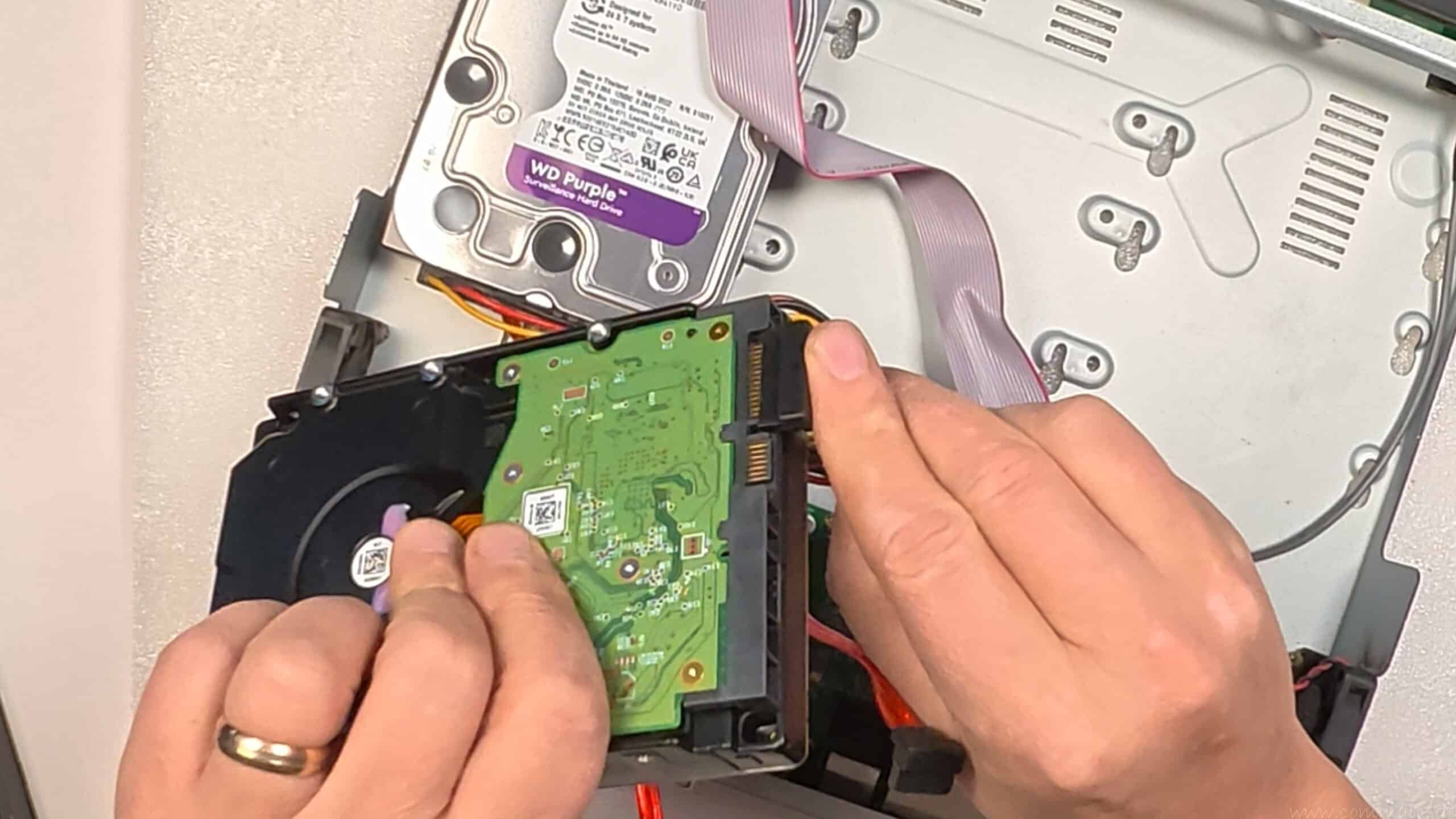
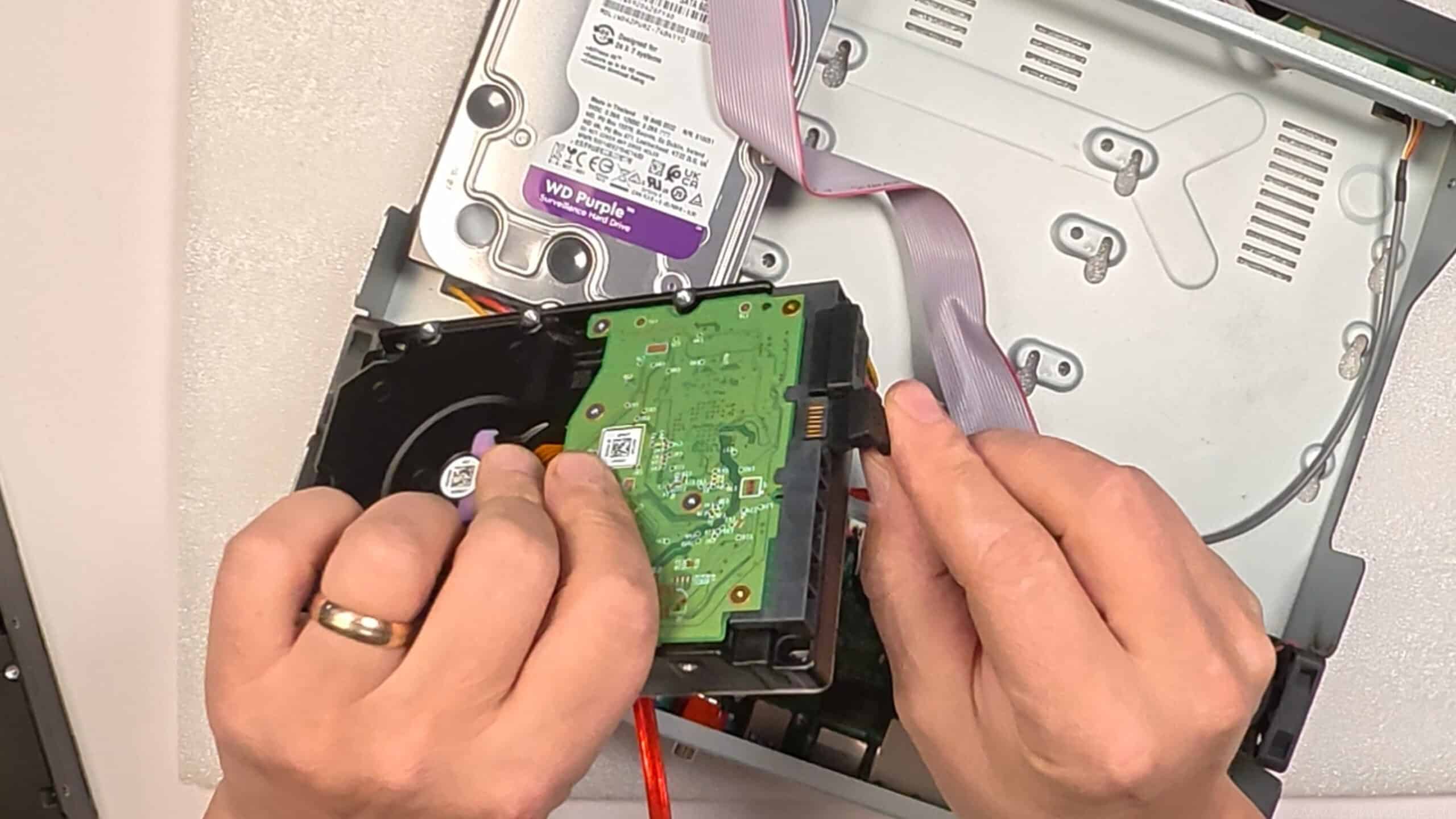
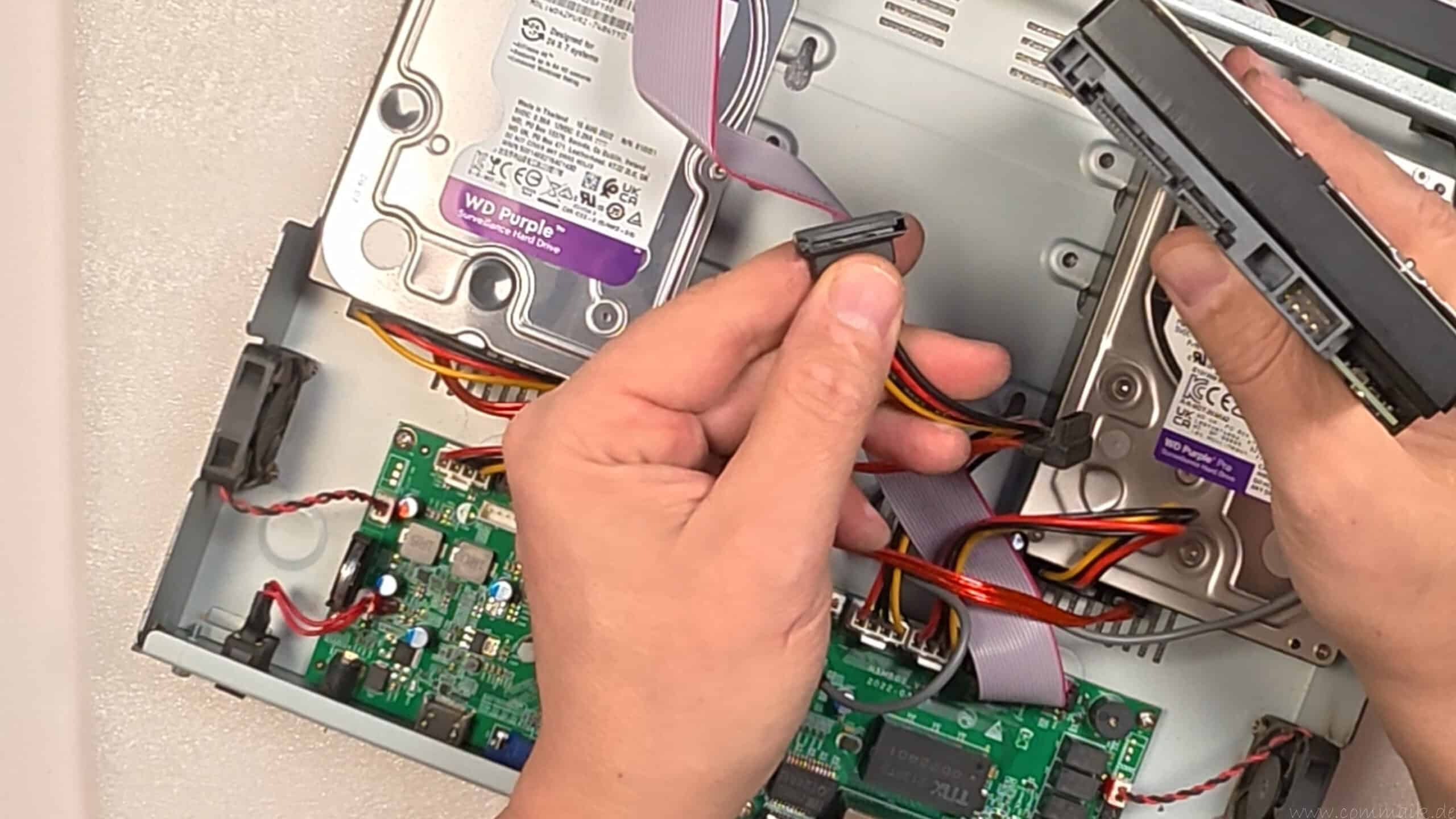
Now comes the practical part. Installing an HDD in a Reolink NVR is basically straightforward, but it is still worth working cleanly and with concentration. Small errors – especially with cables or mounting – often lead to vibrations, contact problems or an unrecognized hard drive later on.
Step-by-step procedure
- Opening the housing
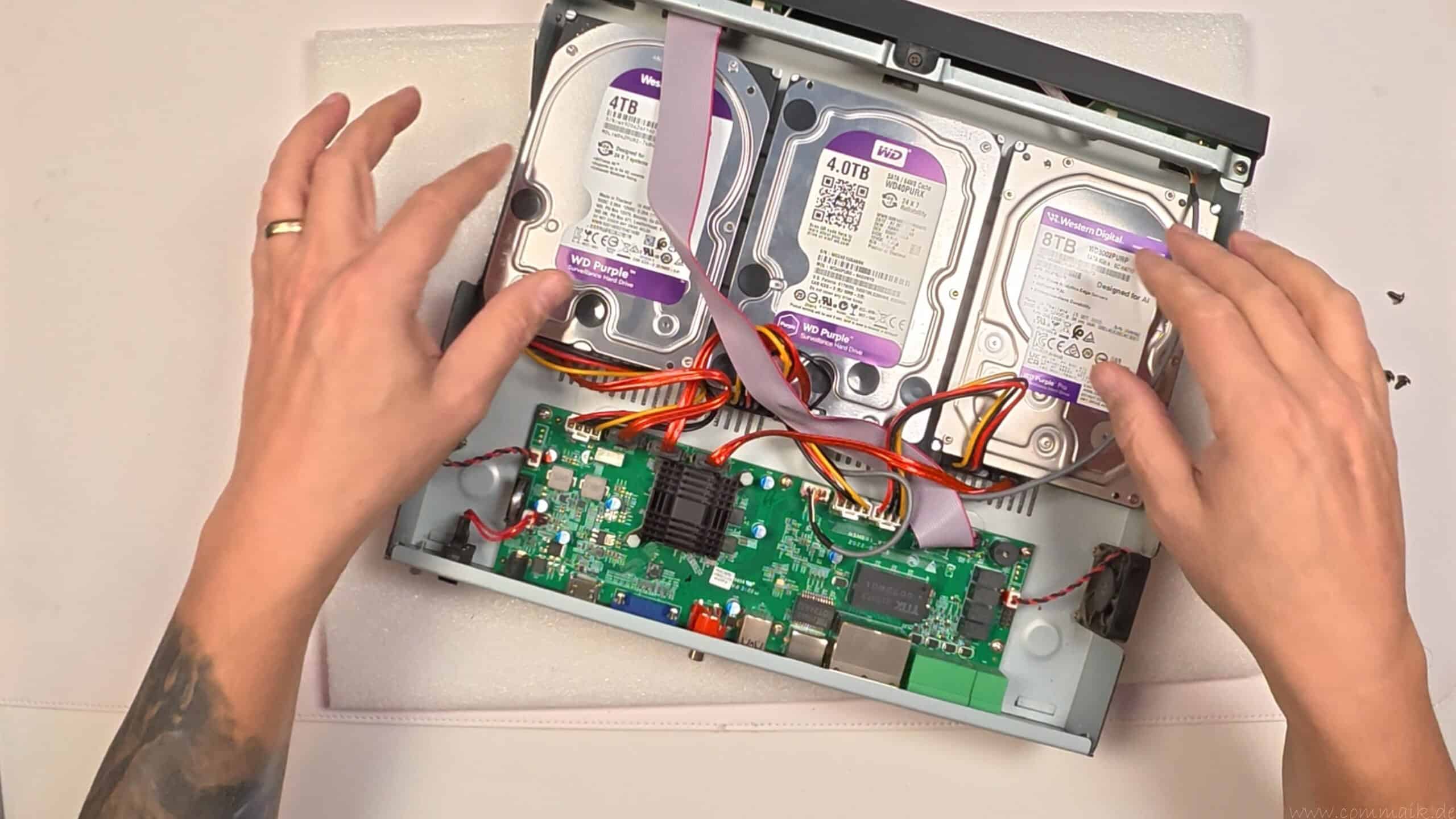
- Insert internal HDD
- Connecting the SATA data and power cable
- Screwing in the HDD
- Close housing
The SATA connectors only fit in one direction. Nothing should be forced here.
I have installed three internal HDDs in my RLN36: 4TB + 4TB + 8TB.
What to look out for during installation
Work without electricity:
The NVR must be completely shut down and disconnected from the power supply.
Clean workplace:
Do not leave any loose metal parts lying around and it is best to work on a non-conductive surface. An antistatic carpet pad is useful, especially in winter.
Align the hard disk correctly:
The HDD must be positioned so that the connections (SATA data + power) can be reached later without pulling. Cables should not be live.
Do not forget the screw connection:
The hard disk is firmly screwed down so that it does not vibrate. Loose HDDs ensure:
- more noise development
- stronger vibrations
- Higher load on the mechanics
- In extreme cases, contact problems with plugs
Do not crush the cable:
When closing the housing, ensure that no cables are trapped between the cover and housing.
Connect SATA cable correctly (data + power)
An HDD usually has two connections:
- SATA data cable (narrow connector)
- SATA power cable (wide plug)
Both plugs are “coded”. This means that they only fit in one direction because they have a small L-shape or nose.
This is how I proceed:
- First place the HDD in a stable position
- Then plug in the SATA power cable
- completely up to the stop
- Do not apply at an angle
- Then connect the SATA data cable
- also put on straight
- Ensure a tight fit
Important:
If a connector is only “half” seated, the NVR often does not recognize the HDD or it disappears sporadically later. This is one of the most common sources of error, especially with multiple HDDs.
Typical mistakes when connecting (and how I avoid them)
- Plug fitted at an angle: → Always attach straight, do not lever
- Cable under tension: → Lay the cable routing so that nothing pulls
- Not fully plugged in: → After connecting, lightly check the plug once
- Cable swapped: → Data is narrow, power is wide






Video: Install Reolink NVR hard disk and expand memory – step-by-step guide
In my practical video, I show the complete procedure from safely shutting down the NVR to installing the internal HDD, formatting and memory management in the menu. In addition, I explain the differences between the Reolink NVR models, the maximum hard disk size per device and how the system works with multiple HDDs.
You can find more projects involving Reolink NVRs, IP cameras and storage solutions in my YouTube playlist Smarthome and in my blog category Smart Home.
If you are interested in other technical projects, installations and practical tests, you can regularly find new content about surveillance technology, networks and smart homes on my YouTube channel.
Zuletzt aktualisiert am 17. March 2026 um 03:43 . Ich weise darauf hin, dass sich hier angezeigte Preise inzwischen geändert haben können. Alle Angaben ohne Gewähr. (*) Bei den verwendeten Produktlinks handelt es sich um Affiliate Links. Ich bin nicht der Verkäufer des Produktes. Als Amazon-Partner verdiene ich an qualifizierten Verkäufen. Dein Preis ändert sich jedoch nicht.


Format and manage hard disks in Reolink NVR
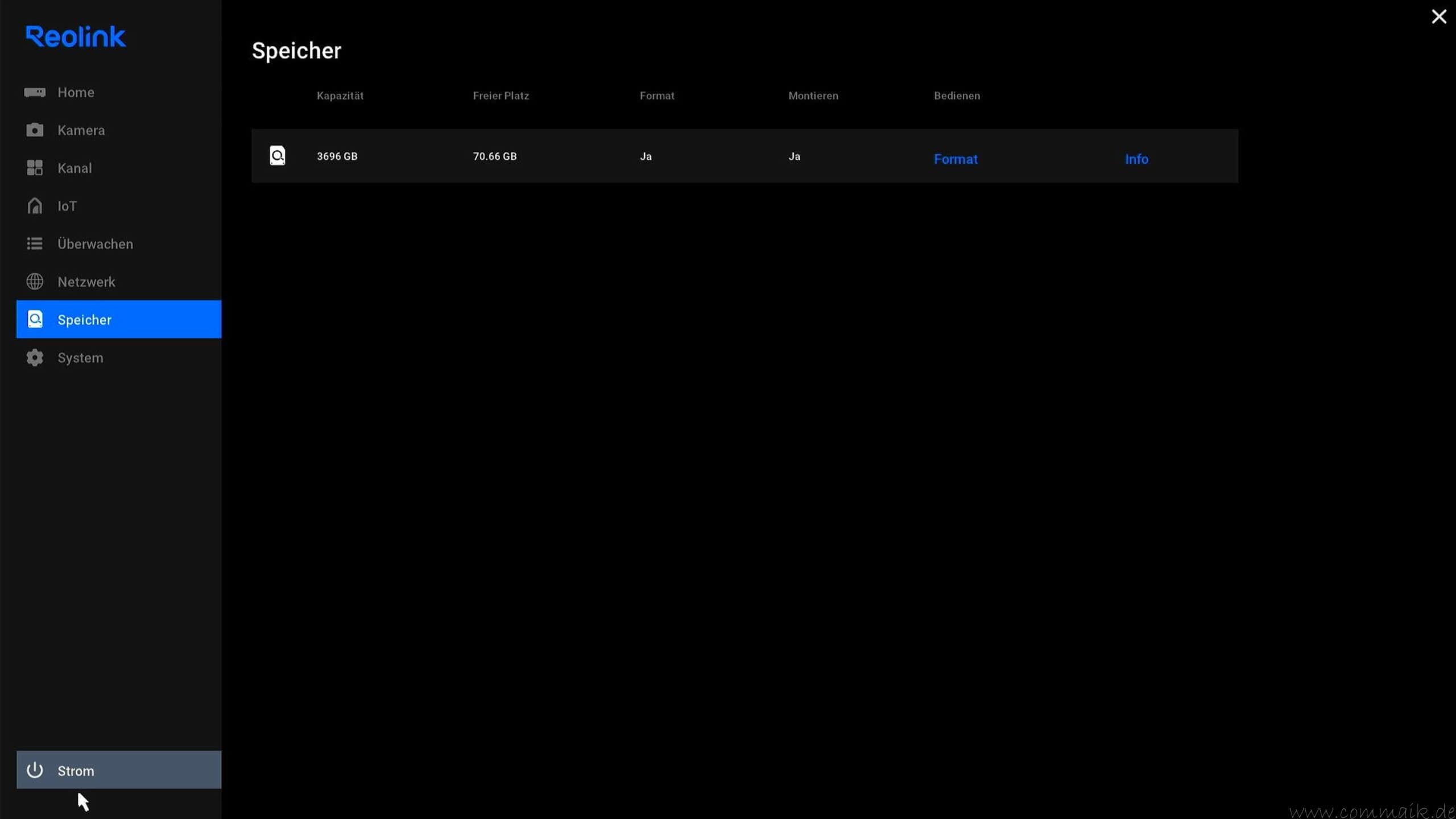
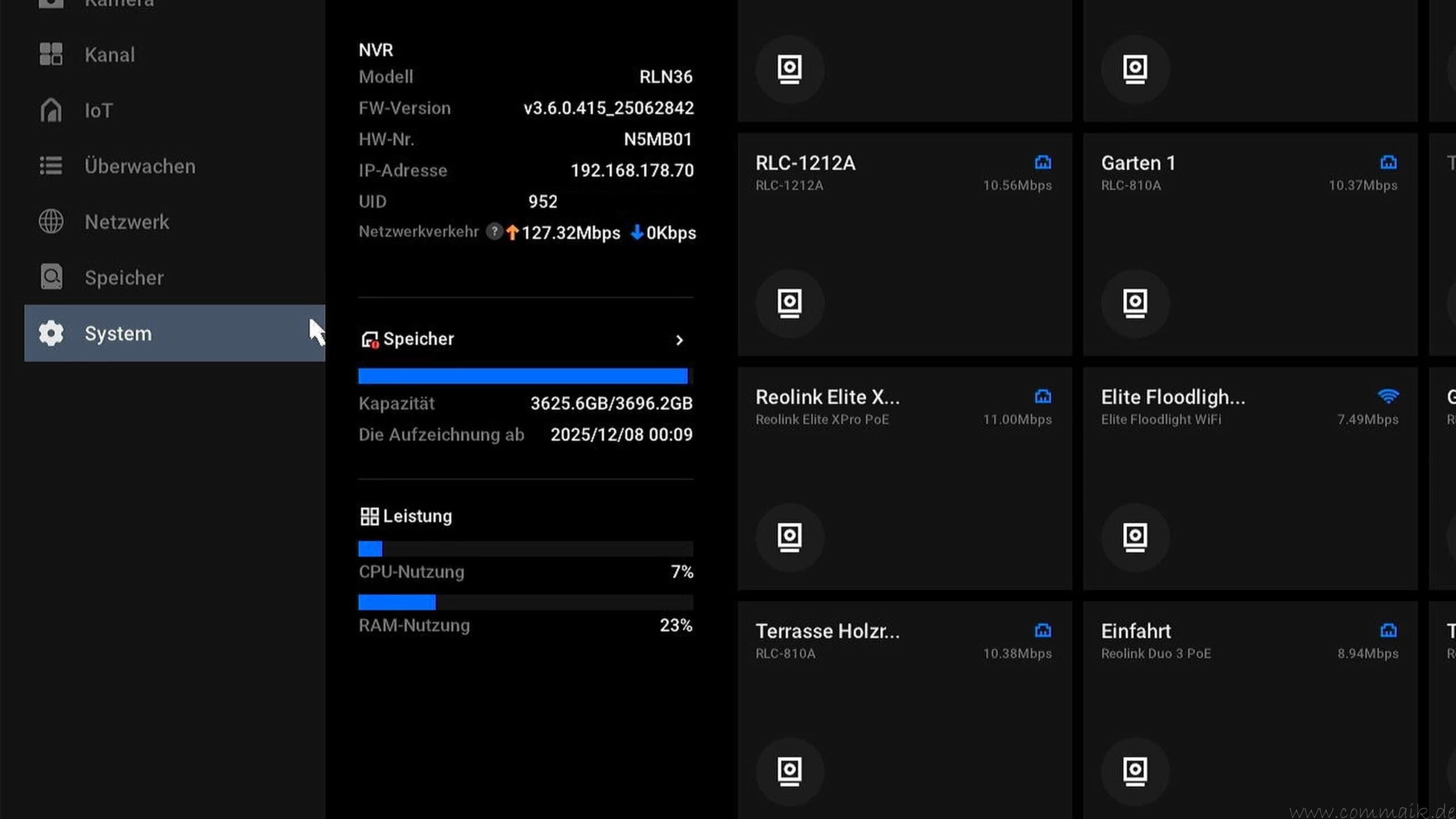
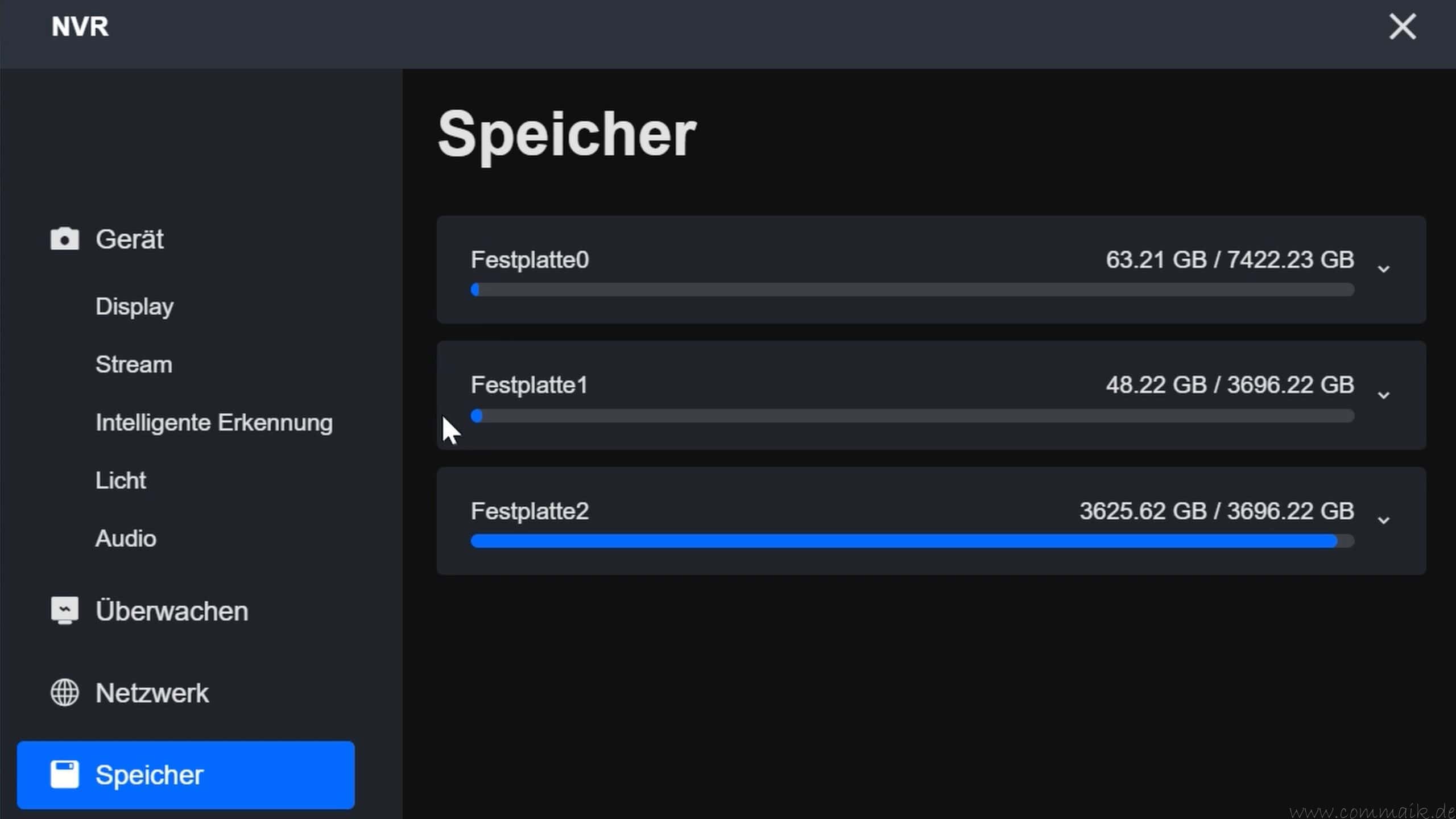
After power on, the Reolink NVR will automatically recognize newly installed HDDs. They are displayed in the system, but are not yet ready for use.
In the menu:
Settings → Memory
the drives are initially displayed with 0 GB. This is normal as long as they have not yet been formatted.
Only after formatting are all HDDs fully available and the new storage space is calculated correctly.
Why do hard disks have to be formatted in the NVR?
A new or previously used HDD has an existing file system – for example NTFS or exFAT from a Windows system.
However, an NVR works with its own, specially optimized file system for continuous video recording. This system is designed for this:
- write large amounts of data sequentially
- Manage recordings efficiently
- Overwrite memory blocks cyclically
- organize several camera streams simultaneously
Without formatting, the NVR cannot integrate the hard disk correctly into its storage management.
The formatting:
- deletes existing partitions
- creates a compatible file system
- initializes the HDD for serial recording
- integrates them into the internal memory logic


Why should the formatting be done directly in the NVR?
Formatting should always be carried out within the NVR environment – not on the computer.
There are several reasons for this:
1. compatible file system
The NVR creates its own system format. Pre-formatting on the PC is of no advantage and will be overwritten anyway when mounting.
2. correct storage integration
The NVR registers the HDD internally in the system during formatting. This means that the device knows exactly which disk is taking over which storage area.
3. avoidance of partition conflicts
Hard disks that were previously used on the computer often contain hidden partitions or residual data. Formatting in the NVR removes these completely.
4. reduction of error sources
If an HDD is formatted on the PC, it may be recognized by the NVR but not used correctly. This leads to 0 GB displays or incorrect status messages.
Formatting directly on the device ensures that the file system is compatible and that the memory is fully usable. Prior formatting on the PC is not necessary and in the worst case can lead to unnecessary compatibility problems.
How does a Reolink NVR with multiple HDDs work?
Anyone who installs several HDDs in a Reolink NVR often assumes that the system works like a classic RAID – i.e. with mirroring or automatic data backup. However, this is not the case. A Reolink NVR has a different storage strategy, designed for maximum capacity and continuous recording, not redundancy.
Understanding this storage logic is crucial, especially when it comes to data security or the failure of a hard disk.
Serial description of the HDDs
The NVR writes to the hard disks serially, i.e. one after the other:
- first HDD 0
- then HDD 1
- then HDD 2
This means that the system starts with the first internal HDD and uses its entire storage area. The NVR only writes to the next hard disk when it is fully occupied. If this is also full, the third HDD is used.
Once all HDDs have been filled, the NVR restarts at the first one and overwrites the oldest recordings. This cyclical memory management is typical for monitoring systems, as they do not archive but record continuously.
The HDDs are logically combined into one large storage area, but are managed separately internally.
What happens if a hard disk fails?
If a single HDD fails, this has a concrete effect on the stored time period:
- only the periods of this plate are missing
- all other periods are retained
- No camera is exclusively assigned to a hard disk
As the storage takes place over time and not camera by camera, a failure does not affect individual cameras, but a continuous period for all connected IP cameras.
For example, the records from February 10 to 20 may be missing, while earlier and later periods are complete.
The remaining HDDs will continue to function and the NVR will continue recording with reduced total capacity.
Archiving instead of backup
The system is therefore to be understood as an archive solution. It maximizes the available storage capacity, but does not offer mirroring or automatic data backup.
If you want to save critical recordings permanently, you should also plan a backup concept, for example via NAS, FTP or regular export of important clips.
Data security and backup
An NVR is first and foremost a recording system. It stores video data reliably and manages it cyclically, but does not replace a long-term backup concept.
If you want to save important events permanently, you should plan additional measures. Surveillance systems with multiple cameras and high resolution in particular quickly generate large amounts of data – pure NVR operation without a backup strategy harbors risks.
The following measures have proven successful in practice:
- Exporting clips to USB
Important events can be exported directly on the NVR or via the client software. Individual video files are saved to a USB stick or an external hard disk. This method is particularly suitable for individual, relevant events that are to be archived for the long term. - Back up to NAS
Additional storage on a NAS system significantly increases data security. The NVR can export recordings or – depending on the model – forward them automatically. This creates a second, physically separate storage level. If an HDD in the NVR fails, the backed-up data is retained on the NAS. - Use FTP
Some systems allow recordings to be transferred to a server via FTP. This solution is suitable for automated backups or for installations where recordings are to be stored externally – for example, outside your own building. - Carry out regular SMART checks
Checking the SMART values of the HDD helps to detect impending defects at an early stage. Rising Reallocated Sector values or other warning indicators are an indication that a hard disk should be replaced before data loss occurs.
Why an NVR is not a backup system
An NVR is designed to record continuously and automatically overwrite older data. This makes technical sense, as monitoring systems constantly generate new data.
However, there is no mirroring of the HDDs, no automatic redundancy and no long-term archiving. If a hard disk fails or a certain period of time is overwritten, this data is lost without an additional backup.
Therefore:
The NVR is the operational recording system. A backup is a separate, deliberately planned security measure.

- 2,5 GbE ist ein Muss
- Quad-Core für Multitasking
- Reibungslose Videokonvertierung
- Aufrüstung auf Dual-Port 10GbE
- Schnellere USB-Übertragung
- Mehr M.2 NVMe SSDs
Summary – Reolink NVR models at a glance and the right storage strategy
In this article I have analyzed the Reolink NVR models at a glance – maximum hard disk size and storage capacity in detail and classified them in a practical way. An NVR forms the central recording device of an IP-based surveillance system and stores the video data from several cameras reliably and in a structured manner on internal HDDs.
The decisive factors when choosing a suitable model are:
- Number of supported HDDs
- Maximum permitted hard disk size per drive
- Maximum total storage capacity
- Expansion options such as eSATA
With up to 48TB total volume, the RLN36 offers the largest internal storage capacity for extensive 4K installations. The RLN16-410 represents a powerful mid-range solution, while the RLN8-410 with eSATA extension is a flexible solution for smaller systems. The RLN12W, on the other hand, has a fixed memory limit and is suitable for compact WLAN installations.
Another focus was on choosing the right hard disk. Only surveillance HDDs should be used for a Reolink NVR, as they are optimized for 24/7 continuous operation, parallel video streams and high data rates. Desktop HDDs or SSDs are not suitable for this purpose in the long term.
It is also important:
- Test new HDDs before installation (SMART test)
- shut down the NVR correctly
- Format hard disks exclusively in the NVR
- Understand the serial storage principle (no RAID)
A Reolink NVR does not work with mirroring, but writes to several HDDs one after the other. If a hard disk fails, a certain period of time is missing for all cameras – not individual cameras. The system is therefore used for archiving, not as a backup.
An additional backup concept, for example via NAS, FTP or manual exports, therefore makes sense for long-term data security.
If you know the maximum hard disk size and storage capacity of your NVR model, use suitable surveillance HDDs and plan a well thought-out storage strategy, you will have a stable and scalable surveillance system with a clearly calculable storage period.

- 4K UHD Dual-Objektiv mit 6x Hybridzoom: Das ultraklare 4K-Weitwinkelobjektiv bietet ein breites Sichtfeld, während das Tracking-Objektiv mit 6x Hybridfokus klare Nahaufnahmen und sogar weit entfernte Details erfasst. Ideale Wahl für die Überwachung von Einfahrten, Vorgärten, Hinterhöfen und Haustieren.
- 270° PIR-Erkennung + Auto-Tracking: Ausgestattet mit KI-Erkennungstechnologie und 270° PIR-Erkennung erkennt diese 360° schwenkbare WLAN Kamera Outdoor automatisch Personen, Fahrzeuge und Tiere auch außerhalb ihres Sichtfeldes, löst sofort die Verfolgung des Objekts aus.
- Intelligentes Floodlight-System: Mit 3000 Lumen ultrahellen Flutlichts sorgt diese Outdoor Kamera für superklare Nachtsicht in jeder Umgebung. Das Beleuchtungssystem ist flexible einzustellen, inkl. Helligkeit, Farbtemperatur, mehrere Beleuchtungsmodi, zeitgesteuertes Ein- und Ausschalten.
- Lokale KI-Videosuche: Geben Sie einen beschreibenden Text ein, z. B. „Person mit Baseballkappe“, um die gesuchte Person schnell und effizient in lokal gespeicherten Alarmvideos zu finden. Die gesamte Suche wird lokal auf dem Gerät durchgeführt, wodurch Datenschutz gewährleistet ist und keine zusätzlichen Gebühren anfallen.
- 24/7-Aufzeichnung & Flexible Speicherung: Diese 360° Aussenkamera unterstützt mehrere Speicheroptionen, darunter microSD-Karten (bis zu 512 GB), Reolink PoE & WiFi NVR & Reolink Home Hub/Home Hub Pro, FTP/NAS und Cloud, und ermöglicht so eine 24/7-Daueraufzeichnung, ohne monatliche Gebühren für lokale Speicherung.
- Dualband Wi-Fi 6 & Einfache Installation: Dank 2,4&5GHz Wi-Fi 6 bietet diese Floodlight Cam eine schnellere und stabilere Netzwerkverbindung. Unterstützt kabelgebundene Installation im Spannungsbereich von AC 100–240 V Wechselstrom, kompatibel mit den meisten Haushaltsanschlussdosen.
FAQ – Reolink NVR, maximum hard disk size and memory expansion
1. what is the maximum hard disk size supported by my Reolink NVR?
This depends on the respective model and partly on the hardware version. The RLN36 supports up to 3× 16TB (48TB in total). The RLN16-410 has a total capacity of 12TB or 16TB, depending on the version. Depending on the version, the RLN8-410 can be expanded internally and via eSATA to up to 16TB. The RLN12W is limited to 8TB internally.
2. can I install any hard disk in a Reolink NVR?
Technically, many SATA HDDs fit, but only surveillance hard disks are recommended. These are optimized for 24/7 continuous operation and continuous video recording.
3. do I have to format a new HDD in the NVR?
Yes. New or previously used hard disks must be formatted directly in the NVR. This is the only way to create the appropriate file system and integrate the HDD correctly into the storage management.
4. why is my new hard disk displayed with 0 GB?
New HDDs initially appear in the storage menu with 0 GB as long as they have not been formatted. The full capacity is only available after formatting.
5. does a Reolink NVR support RAID?
No. Reolink NVRs do not work with RAID. The hard disks are written to serially. There is no mirroring or automatic data backup between the drives.
6. what happens if an HDD in the NVR fails?
In the event of a failure, the time period that was saved on this hard disk is missing. Other time periods on the remaining HDDs are retained. It is not individual cameras that are affected, but a continuous period of time.
7. can I connect an external hard disk to my Reolink NVR?
This depends on the model. Some versions of the RLN8-410 and RLN16-410 have an eSATA port for expansion. USB is not generally intended as a permanent storage solution for recordings.
8. is an SSD in the Reolink NVR useful?
An HDD is the better choice for classic video recording. SSDs are more expensive per TB and are not optimally designed for continuous, years-long write loads.
9. why must the NVR be shut down correctly before installing or replacing a hard disk?
Improper disconnection of the power supply can cause file system errors and damage the HDD mechanically. Shutdown should always be carried out via the menu.
10. how long does a Reolink NVR store recordings?
The storage duration depends on the number of cameras, the resolution (e.g. 4K), the bit rate and the total capacity installed. If all HDDs are full, the system automatically overwrites the oldest recordings.
Dieser Beitrag ist auch verfügbar auf:
 English
  Deutsch


Ähnliche Beiträge

Reolink Argus 4 Pro review: The wireless surveillance camera with 4K and ColorX technology
Installing a mobile diesel parking heater in the garden shed